The platform

Plan, run, verify and bill employee transport in one place

Real Tech covers the whole day: from the roster your HR team uploads to the bill your vendor raises.

01Routing · Before the shift

Routes that build themselves before every shift

At the lead time you choose, for example two hours before a shift, Real Tech plans that shift's pickups or drops on its own. No button to press, no overnight planning.

  • Seat-aware grouping: employees who live near each other share a vehicle, never more than it can seat
  • Efficient stop order: stops are re-ordered to cut distance, so vehicles don't zig-zag across the city
  • Times worked out: departure time, trip duration and a pickup time for every employee
  • Vehicles assigned: only vehicles that are free on that date, and the same vehicle that brought someone in takes them home
  • Sent out automatically: trips go to the driver's phone, with a notification to the driver and every passenger
  • Still in your control: change the vehicle or vendor, drag stops into a new order, or move a route to another vendor
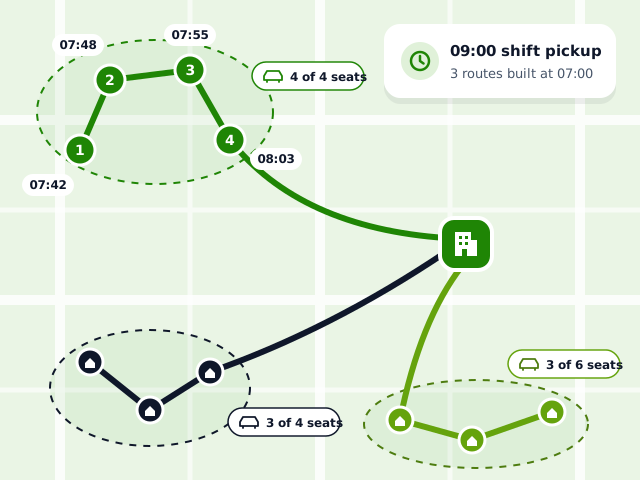
Employees grouped by seats into three routes to the office, with stop order and pickup times
02Live tracking · During the shift

See every vehicle, trust every driver

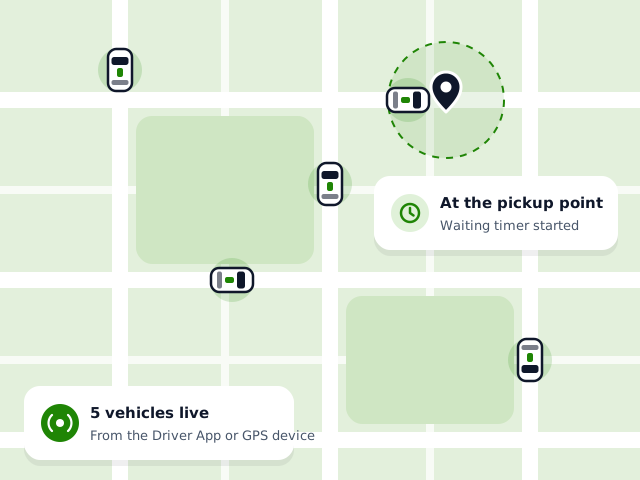
  • Live map: every running vehicle, from the Driver App or your existing GPS devices
  • Pickup geofence: the driver's waiting timer starts only when the cab has reached the pickup point
  • Trip status: completed and pending rides, per office and date
  • Speed and punctuality: speed violations and on-time arrival and departure, from the same GPS data
SOS, escorts and compliance Live map of vehicles on trips, with one cab waiting inside the pickup point's geofence
03Vendors & billing · Month end

Pay vendors for the trips that actually ran

  • Vendor Portal: vendors accept bookings, assign their vehicles, mark vehicles unavailable for maintenance and see today's routes live
  • Contracts per shift and office: regular, package and shuttle contracts, with the billing model each one uses
  • Split the work: share a shift across several vendors by percentage
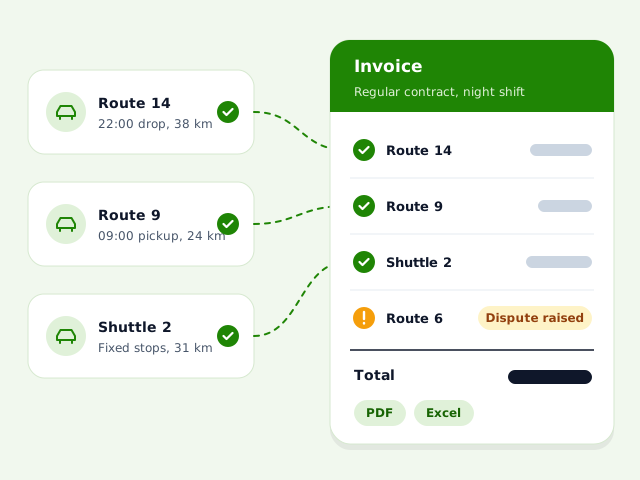
  • Bills from real trips: a bill line is created when each trip is dispatched, under the right contract
  • Invoices: by vendor, contract or date range, exported to PDF or Excel
  • Disputes: you or the vendor raise a dispute on a bill and resolve it with remarks
Completed trips becoming lines on a vendor invoice, with one line under dispute
04Reports · Any day

Numbers you can put in front of management

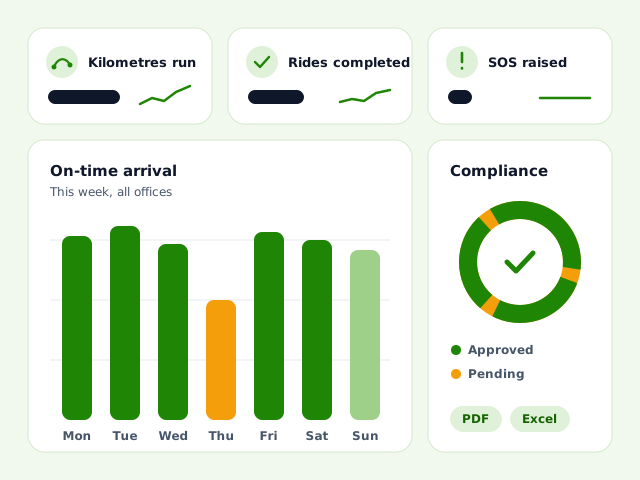
  • Dashboard: kilometres run, completed and pending rides, SOS, compliance and bills, per office and date
  • Ten reports: employees, rides, routes, compliance, SOS, escorts, speed violations, on-time arrival, on-time departure and today's summary, exported to Excel or PDF
  • Activity log: who did what, and when
  • Help desk: tickets with status and remarks, FAQs and notification lists
Dashboard with headline numbers, on-time arrival by day and compliance status
Trip types

Every kind of trip your offices run

Home pickup & drop

Daily door-to-door or shared pickup-point trips, planned from each employee's shift and home location.

Shuttle routes

Fixed routes with named stops and reach times, a QR code per route, and trips created automatically for assigned employees.

Ad-hoc bookings

One-off rides for employees or guests, with distance estimated at booking. The vendor accepts and assigns a vehicle in their portal.

Setup & roles

Set up in days, not months

  1. Offices & shifts

    Every office with its location, shifts, holidays and weekly offs.

  2. Excel import

    Bulk upload of employees, schedules, drivers, vehicles, shifts and holidays from templates.

  3. Roles & access

    Roles with view, create, edit, delete and import rights per area, limited to chosen offices.

  4. Invite employees

    Invite employees by email, assign shifts, and keep home and pickup locations on a map.

Mobile apps

Apps for the people on the road

Android apps for drivers and employees, given to your people when we onboard your company.

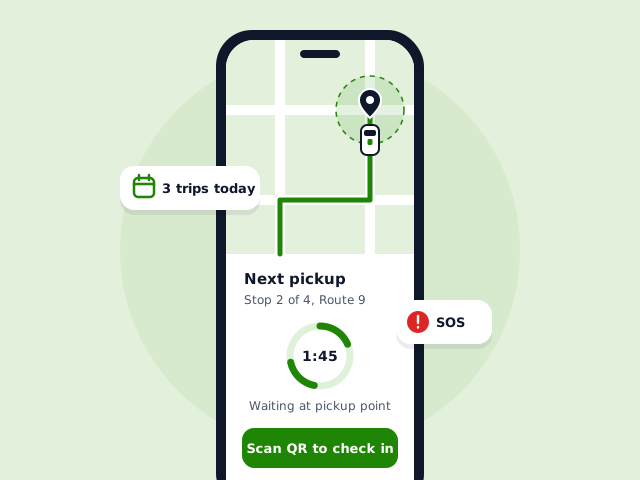
Driver App showing the next pickup, a waiting timer and QR check-in

Driver App

  • Login with mobile number and OTP
  • Today's regular, shuttle and ad-hoc trips
  • Map with every pickup point
  • Waiting timer that starts only at the pickup point
  • QR scan to check employees in and out
  • SOS with voice recording
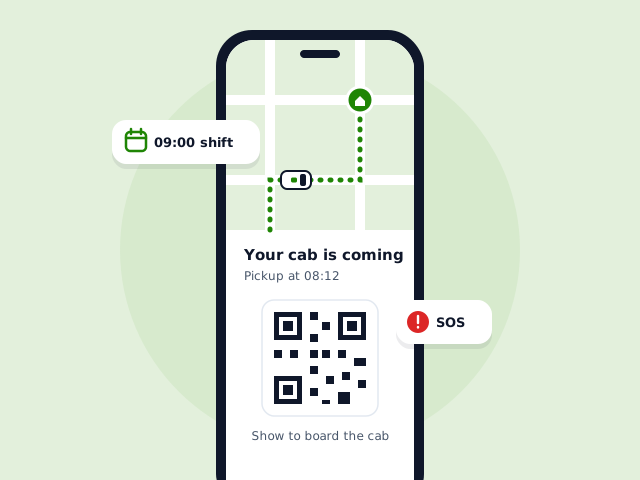
Employee App showing the cab on its way and a QR code to board

Employee App

  • Choose shifts, ask for leave or cancel a trip
  • See the cab live on the map
  • QR code to board and leave the cab
  • Notification preferences, help and FAQs
  • Book ad-hoc rides and see ride history
  • SOS with voice recording

Want to see it on your own data?

We'll walk you through Real Tech and share detailed pricing for your offices and shifts.

Book a Demo